
How to Host a Discord Bot 24/7 (Free & Paid Options in 2026)
Discord bot development hit mainstream hard - everyone's building one. But a bot that stops responding whenever your laptop is closed is useless. True 24/7 hosting is the barrier between a hobby bot and a reliable community tool. This guide compares every hosting path in 2026: free hosts, shared hosts, and a cheap VPS you control - with real uptime, cost, and security trade-offs.
Why You Can't Just Run It on Your PC
Hosting a Discord bot from your home computer has three fatal flaws: uptime - the bot dies when you sleep, your PC updates, or the power flickers; IP/DoS exposure - your home IP becomes public, inviting DDoS attacks (bot raiders do this); and scalability - a busy bot with many guilds needs more CPU/RAM than your laptop can spare without affecting you. For a serious bot, dedicated 24/7 hosting is non-negotiable. The one exception: a personal bot for your own small server where occasional downtime is fine - then free hosting or your PC works.
Free Discord Bot Hosting: The Realistic View
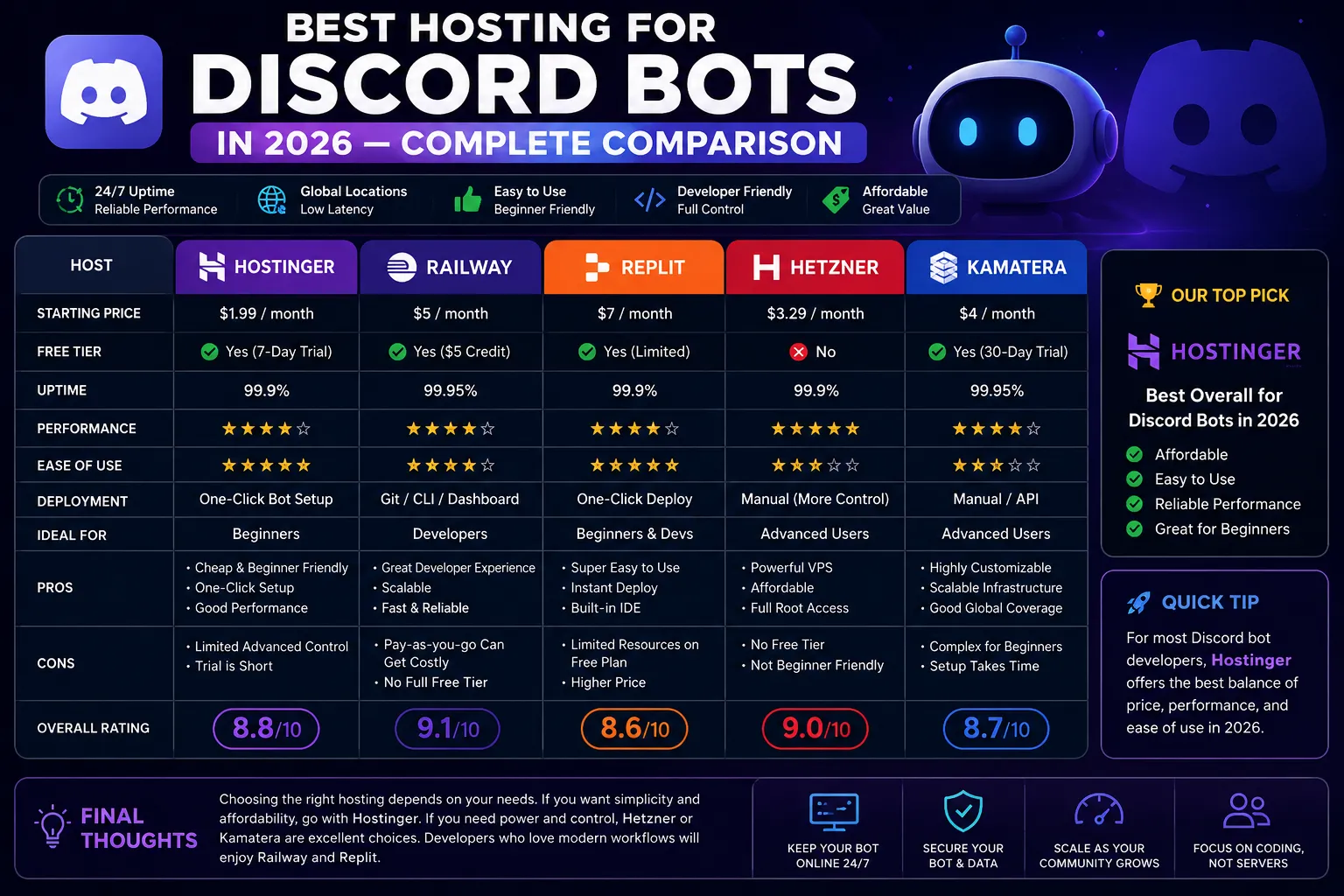
Free hosts (like the well-known Replit/Glitch hosting or community free tiers) work for small bots but come with catches in 2026: they sleep/throttle inactive or under-resourced projects (the bot goes offline on inactivity with many providers), they have strict CPU/RAM limits that crash heavy bots, and their shared IPs are sometimes rate-limited or blocked by Discord. Free tier of cloud services (e.g., limited-time dev credits) are better but require management, dyno/credit systems, and a card to sign up. My honest advice: free hosting is a great way to test a bot and learn. If the bot is meant to serve a real community, budget ~$5/month for a VPS and stop fighting the free-tier limits. Hosting cost is the last thing that should hold a project back.
Paid VPS Hosting: The Best 24/7 Solution
A cheap VPS is the gold standard for Discord bot hosting. Why: true 24/7 operation - the VPS runs independently of your devices; full control - run Node.js, Python, Java, your runtime exactly as needed, plus install anything else (databases, webhooks, cron); protection - a hosted IP with DDoS shielding absorbs the attacks bots attract; and scaling - upgrade RAM/CPU in minutes as your bot grows. Recommended minimums: small bot: 1 GB RAM, 1 vCPU. Bot with database + many guilds: 2 GB RAM, 1-2 vCPU. Heavy bot (image processing, lots of API calls, slash command caching): 4 GB. You run the bot with a process manager (pm2) so it restarts automatically after any crash or reboot.
Step-by-Step: Deploy a Discord Bot on a VPS
1) Get a VPS (Singapore for South Asia at 30-50ms, or wherever your users cluster) and deploy Ubuntu 22.04. 2) SSH in and update: apt update && apt upgrade -y. 3) Install Node.js (or Python): node 20+ via Nodesource for discord.js v14. 4) Transfer your bot code (git clone or scp) and run npm install. 5) Set environment variables (token, IDs) via a .env file - never hardcode or commit tokens. 6) Install pm2: npm i -g pm2, then pm2 start. 7) Make it auto-start on reboot: pm2 save && pm2 startup. 8) Set up a firewall (ufw) to allow only SSH and your bot's outbound calls. 9) Point your token's application on the Discord Developer Portal to the correct public/bot URL with the standard gateway. Your bot now survives restarts, crashes, and reboots - true 24/7.
DDoS Protection: Non-Negotiable for Bots
Discord bots with any audience get DDoS'd - competitors, raiders, and trolls all do it. Consequences: the bot goes offline, and on a home IP you risk your whole home network. That's why VPS hosting with DDoS protection matters: enterprise-grade mitigation absorbs volumetric attacks and keeps the bot connected to Discord's gateway. When choosing hosts, insist on: real DDoS mitigation (not marketing), and the ability to reach your bot for maintenance. Cheap no-name 'bot hosts' often colocate on oversold boxes - when they get attacked, your bot goes down with them. A reputable VPS with a DDoS shield (CyberNex includes 17 Tbit enterprise protection on all VPS) avoids this class of problem completely.
Monitoring, Backups, and Keeping It Alive
Once your bot is on a VPS, a little infrastructure keeps it healthy. Process manager: pm2 auto-restarts on crash and after reboot. Health checks: a simple cron pings your bot's API endpoint and restarts it if it stalls. Logging: rotate logs with pm2-logrotate so a giant log file doesn't fill the disk. Backups: if your bot has state (databases, configs), schedule daily snapshots - cheap insurance that costs seconds. Alerts: add a status channel in Discord that your bot posts a heartbeat to every few minutes; when the heartbeat stops, you know instantly. Watch RAM: discord.js bots with caches can grow slowly; set a generous cache limit or restart nightly.
Hosting a Discord bot 24/7 breaks down into three tiers: free hosting for testing (throttled and unstable), a cheap VPS for reliability (the real answer), and fancy dedicated setups you almost never need. A 1-2 GB KVM VPS with pm2, a DDoS shield, and a simple heartbeat costs about $5/month and runs your bot forever without you lifting a finger. CyberNex VPS plans from €7.67/month give you Node.js-ready Linux, NVMe storage, unmetered bandwidth, and enterprise DDoS protection - deploy your bot in minutes and never worry about your laptop closing again.
Ganidu Sathishka
Support EngineerGanidu is a technical support engineer at CyberNex who helps customers deploy and configure their game servers. He creates beginner-friendly setup guides and troubleshooting tutorials based on common customer questions.
CredentialsTechnical support engineer at CyberNex with 4+ years helping customers deploy and configure game servers. Expert in troubleshooting FiveM, Minecraft, and Discord bot hosting issues across Linux and Windows environments.
More in discord
Discord Bot Hosting
24/7 bot hosting with Git auto-deploy. Node.js, Python, Java. Always online.